The 4+2 Pipeline Thrust Matrix (the 4+2) already tells you what to plan: four pillars that create thrust, two foundations that cut drag, one North Star, and the G1 home rule (one home cell per initiative). This page is the next layer. It shows three deeper planning views you fill with sales so the grid becomes a working plan, not a poster.
Application layer, not a canon change. White paper v1.0 and the master exhibit stay as they are. These views unpack the Map and Run steps. They do not rename pillars, change the North Star, or rewrite the home rules.
In every view, columns across the top are the four pillars in buyer-journey order: 01 Demand Creation, 02 Demand Capture, 03 Pipeline Acceleration, 04 Retention & Expansion. Underneath sits one undivided foundation band for +1 Revenue Operations and +2 Revenue Enablement. That band is never split by row. Foundations are shared capabilities. Dirty data, weak stages, missing playbooks and unfinished builds drag every pillar. Cutting the band into a "pharma RevOps" cell and an "automotive RevOps" cell invents false precision and hides the shared leak.
How the three views chain
- View 1 (pillars by target subsector) first. Agree which subsectors matter and what each pillar must do there.
- View 2 (pillars by buying group) next, once per priority subsector. Name the roles and the initiatives that move each role through each pillar.
- View 3 (pillars by marketing channel) last. Decide which channels are Primary, Supporting or Not used in each pillar, so media and content plans follow the strategy rather than invent one.
Then return to the six method steps: diagnose, baseline, select, map, run, measure. View 1 and View 2 feed Map. View 3 feeds Select and the monthly Run review. All three report against the North Star: marketing-sourced plus marketing-influenced pipeline, shown separately. Every cell still obeys G1: one home, based on the main job. Run-state capability sits in the pillar it serves. Shared plumbing sits in +1. Build or upgrade sits in +2 with an end date.
Who fills them. Marketing lead owns the page. Sales lead co-owns subsector priority, qualified-opportunity definition and buying-group roles. RevOps (or the person doing that job) owns the foundation band notes. Customer success joins when Retention & Expansion is in scope.
Cadence. Draft View 1 in the quarterly planning session. Refresh View 2 for the active subsectors every quarter, and after any major mix shift. Refresh View 3 when the media or content calendar is set, and again if a channel starts owning a strategy it should only support. Review empty and crowded cells with sales every month.
Illustrative company (used in all three views)
Illustrative. A generic industrial equipment maker selling into three priority subsectors: pharma plants, food processing, and automotive. Large ticket. Months-long cycles. Buying groups that include plant or operations leads, technical evaluators, procurement, finance and occasional influencers. No client name. No statistics. All cell text is teaching copy, not a case study.
View 1: Pillars by target subsector
How and when to use it
Questions it answers. Where are we thin by subsector? Are we running the same Creation story for pharma and automotive when the buying situations differ? Is Retention planned only for the installed base in one subsector while another is neglected?
Who fills it. Marketing and sales in the same room, using the enterprise priority list. Do not invent a marketing-only subsector ranking.
Cadence. Quarterly planning, then a monthly glance for empty cells during the portfolio review.
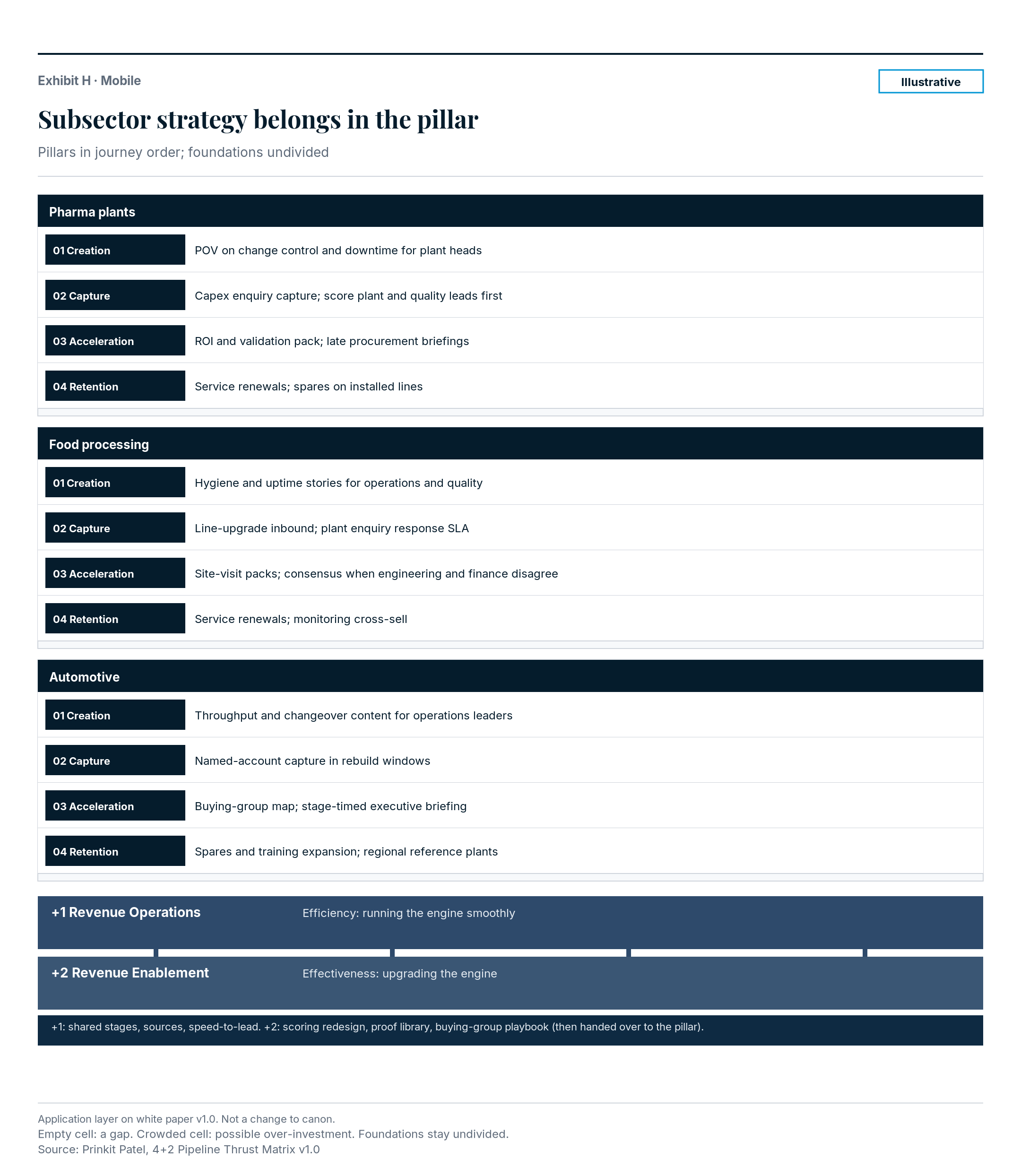
Worked example (Illustrative)
| Subsector | 01 Demand Creation | 02 Demand Capture | 03 Pipeline Acceleration | 04 Retention & Expansion |
|---|---|---|---|---|
| Pharma plants | Point-of-view series on validated change control and downtime risk for plant heads | Search and enquiry capture for capex projects; scoring routes plant and quality leads first | ROI case and validation pack per open opportunity; late procurement briefings | Service-contract renewals; spare-parts expansion on installed lines |
| Food processing | Hygiene and uptime stories aimed at operations and quality roles before a project starts | Event follow-up and inbound for line upgrades; SLA on response to plant enquiries | Site-visit packs for buying groups; consensus brief when engineering and finance disagree | Renewals on service agreements; upsell of monitoring on the same lines (cross-sell of a new line would route via Capture) |
| Automotive | Category entry content on throughput and changeover for operations leaders | ABM and search capture on named accounts entering rebuild windows | Buying-group map on open deals; executive briefing timed to stage | Installed-base expansion of spares and training; reference plants per region |
Foundation band (undivided, all subsectors): +1 Revenue Operations keeps stages, sources and speed-to-lead shared and auditable. +2 Revenue Enablement builds the first scoring model redesign, the proof library refresh and the buying-group playbook, then hands each into run-state.
Blank template
| Subsector | 01 Demand Creation | 02 Demand Capture | 03 Pipeline Acceleration | 04 Retention & Expansion |
|---|---|---|---|---|
Foundation band (+1 Revenue Operations / +2 Revenue Enablement):
Common mistakes
- Filling cells with channel names ("LinkedIn", "events") instead of the subsector strategy for that pillar.
- Giving each subsector its own RevOps row.
- Treating an empty Creation cell as fine because Capture is busy.
- Copying the same sentence into every subsector row.
View 2: Pillars by buying group (within one subsector)
How and when to use it
Questions it answers. Which roles do we actually reach in Creation? Who must be covered before Capture calls an opportunity qualified? Where do deals stall in Acceleration? Whose proof turns Retention into references?
Repeat the grid for each priority subsector. Pharma's economic buyer and automotive's economic buyer are not the same person with a different title. One shared buying-group grid across all subsectors usually lies.
Who fills it. Marketing with sales (and customer success for Retention). Sales names the roles that decide; marketing names the initiatives that reach them.
Cadence. After View 1 is agreed. Refresh when a subsector's deal pattern changes, or when win/loss notes keep naming the same missing role.
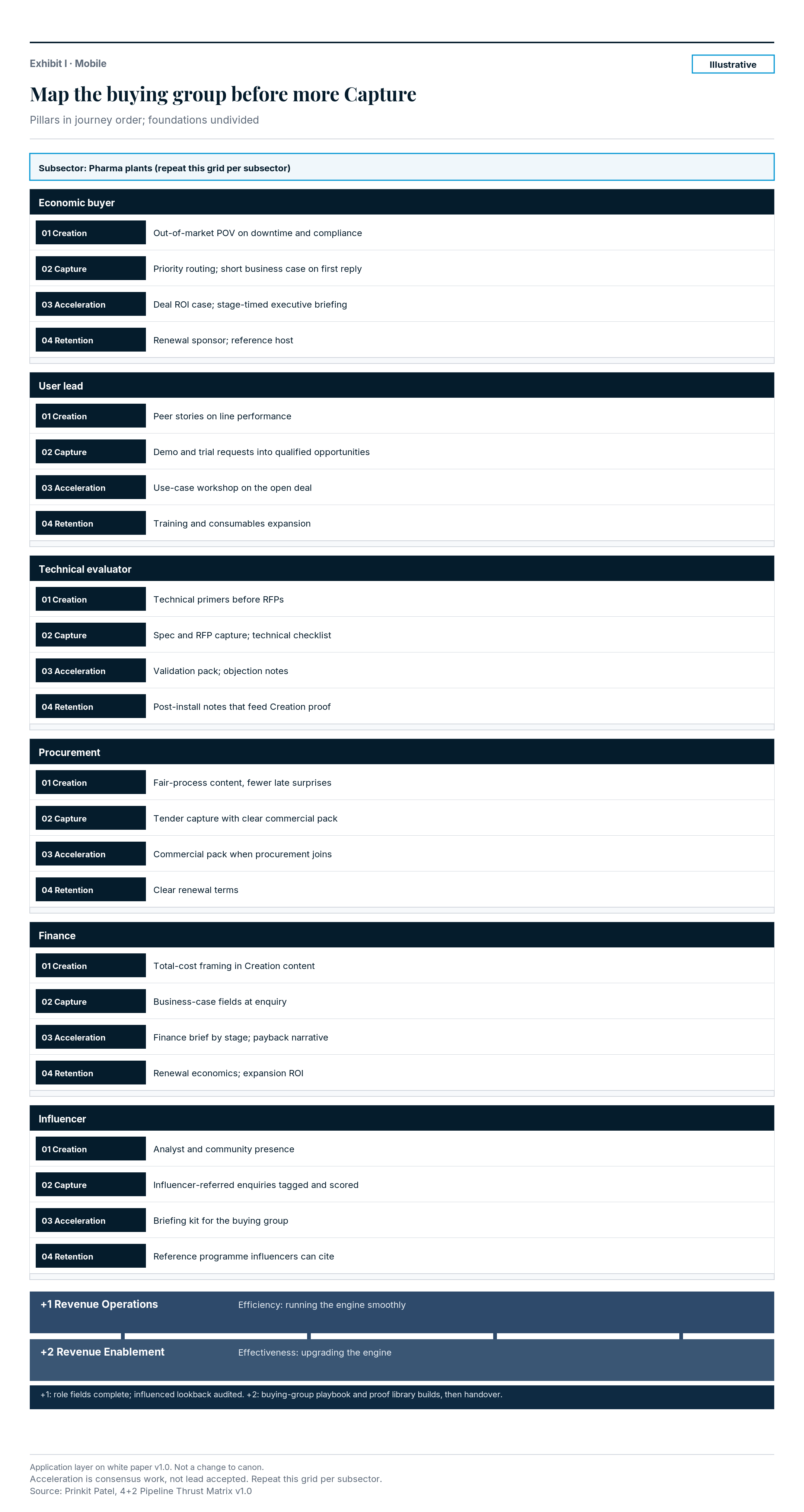
Worked example (Illustrative): Pharma plants only
| Buying-group role | 01 Demand Creation | 02 Demand Capture | 03 Pipeline Acceleration | 04 Retention & Expansion |
|---|---|---|---|---|
| Economic buyer (plant / operations head) | Out-of-market POV on downtime and compliance risk | Priority routing when this role enquires; short business case on first reply | Deal-level ROI case; stage-timed executive briefing | Renewal sponsor; invite as reference host |
| User lead (production / quality) | Peer stories and category entry content on line performance | Demo and trial requests scored into qualified opportunities | Use-case workshop inside the open opportunity | Expansion of training and consumables; day-to-day proof |
| Technical evaluator (engineering / validation) | Technical primers that build memory before RFPs | Spec and RFP capture paths; technical checklist on enquiry | Validation pack and objection notes for the open deal | Post-install performance notes that feed Creation proof |
| Procurement | Fair-process content that reduces late surprise | RFP portal and tender capture with clear commercial pack | Commercial pack and comparison sheet when procurement joins | Contract clarity for renewals; no surprise terms |
| Finance | Total-cost framing in Creation content (not a hard sell) | Business-case fields captured at enquiry | Finance brief aligned to stage; payback narrative | Renewal economics; expansion ROI on installed base |
| Influencer (consultant / corporate engineering) | Analyst and community presence where influencers look | Influencer-referred enquiries tagged and scored | Briefing kit sales can share into the buying group | Reference programme that influencers can cite |
Foundation band (undivided): +1 keeps role fields complete on opportunities and audits the influenced lookback. +2 builds or upgrades the buying-group playbook and proof library, then hands them to Acceleration and Retention run-state.
Blank template (copy once per subsector)
Subsector: ________________
| Buying-group role | 01 Demand Creation | 02 Demand Capture | 03 Pipeline Acceleration | 04 Retention & Expansion |
|---|---|---|---|---|
| Economic buyer | ||||
| User lead | ||||
| Technical evaluator | ||||
| Procurement | ||||
| Finance | ||||
| Influencer |
Foundation band (+1 / +2):
Common mistakes
- One buying-group grid for every subsector.
- Putting open-opportunity briefings in Creation because "it is content".
- Leaving finance and procurement blank until late stage, then blaming cycle length.
- Treating "lead accepted" as the Acceleration finish line.
View 3: Pillars by marketing channel
How and when to use it
Questions it answers. Which channels create thrust in which pillar? Where are we paying for Capture work that should sit in Acceleration? Which channels are Not used on purpose, so the team stops defending them?
Legend. Primary: the channel's main job in that pillar. Supporting: useful, but not the home of the strategy. Not used: deliberately out of scope for that pillar this period.
Who fills it. Marketing owns the first pass. Sales challenges any channel marked Primary in Acceleration or Retention if sales never sees the work. RevOps checks that Primary Capture channels can be traced to source.
Cadence. After Views 1 and 2. Align to the quarterly media and content plan. Revisit mid-quarter if spend shifts without a strategy shift.
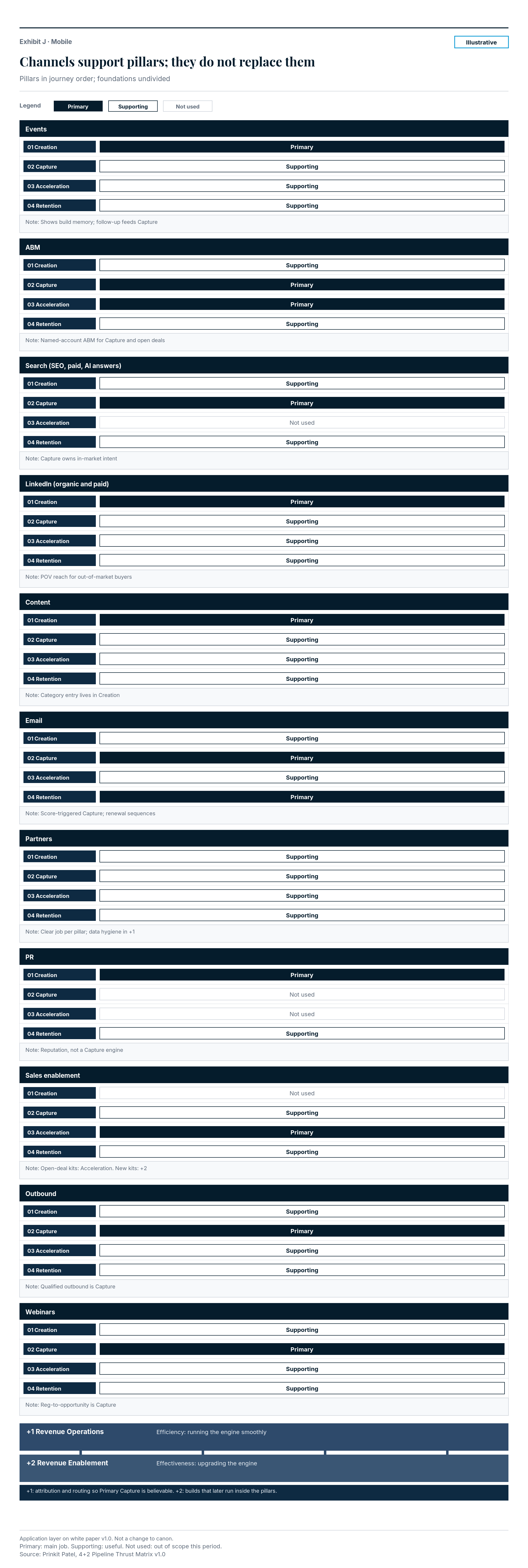
Worked example (Illustrative)
| Channel | 01 Demand Creation | 02 Demand Capture | 03 Pipeline Acceleration | 04 Retention & Expansion | Note |
|---|---|---|---|---|---|
| Events | Primary | Supporting | Supporting | Supporting | Priority shows build memory; follow-up feeds Capture; account days support Acceleration and Retention |
| ABM | Supporting | Primary | Primary | Supporting | One-to-many ABM aids Creation; named-account ABM is Primary for Capture and open-deal Acceleration |
| Search (SEO, paid search, AI answer visibility) | Supporting | Primary | Not used | Supporting | Capture owns in-market intent; Creation uses branded and category visibility; Retention uses support and parts queries |
| LinkedIn (organic and paid) | Primary | Supporting | Supporting | Supporting | Reach and POV for out-of-market buyers; light Capture retargeting; deal and customer posts support later pillars |
| Content | Primary | Supporting | Supporting | Supporting | Category entry and POV live in Creation; deal kits and renewal guides are Supporting elsewhere |
| Supporting | Primary | Supporting | Primary | Nurture supports Creation; response and score-triggered mail are Capture; renewal and expansion sequences are Retention | |
| Partners | Supporting | Supporting | Supporting | Supporting | Partner reach aids all four when the job is clear; partner data hygiene stays in +1 |
| PR | Primary | Not used | Not used | Supporting | Reputation and category presence; not a Capture engine; customer stories support Retention proof |
| Sales enablement | Not used | Supporting | Primary | Supporting | Playbooks and kits for open deals are Acceleration; expansion kits support Retention; building a new kit is +2 |
| Outbound | Supporting | Primary | Supporting | Supporting | Soft outbound can seed Creation; qualified outbound is Capture; account-based outbound on open deals is Acceleration |
| Webinars | Supporting | Primary | Supporting | Supporting | Thought-leadership webinars support Creation; registration-to-opportunity webinars are Capture; deal webinars support Acceleration |
Foundation band (undivided): +1 attribution, routing and stage hygiene so Primary Capture channels are believable. +2 builds (scoring redesign, enablement kits, proof library) that later run inside the pillars above.
Blank template
| Channel | 01 Demand Creation | 02 Demand Capture | 03 Pipeline Acceleration | 04 Retention & Expansion | Note |
|---|---|---|---|---|---|
| Events | |||||
| ABM | |||||
| Search (SEO, paid, AI answers) | |||||
| LinkedIn (organic and paid) | |||||
| Content | |||||
| Partners | |||||
| PR | |||||
| Sales enablement | |||||
| Outbound | |||||
| Webinars |
Legend: Primary / Supporting / Not used. Foundation band (+1 / +2):
Common mistakes
- Marking every channel Primary in every pillar.
- Letting the channel calendar rewrite View 1 strategy.
- Homing a scoring build in Capture instead of +2.
- Calling partner work a fifth pillar.
Tie-back to North Star and G1
Filled views are only useful if they climb the line of sight: enterprise goal, sales target, marketing contribution, then initiatives. The North Star stays marketing-sourced plus marketing-influenced pipeline, reported separately, with the decided influenced rule (marketing touch on a buying-group member within a 90-day lookback before opportunity create or stage advance; sales agrees the window; Revenue Operations audits).
G1 still decides placement. A plant-head ROI case on an open opportunity homes in Pipeline Acceleration, even if the "channel" is marketing content. An operating lead-scoring model homes in Demand Capture. Rebuilding that model homes in +2 until handover. Routine recalibration of the same design homes in +1. Upsell and renewal on converted accounts home in Retention & Expansion. A cross-sell (new buying group or product line) loops back to Demand Capture, then Acceleration.
If a cell cannot climb the cascade, cut it or fix the target. If the foundation band is weak, fix drag before you add more thrust.
What to do next
- Open View 1 with sales and fill three priority subsectors.
- Copy View 2 once per subsector; start with the subsector that leaks most.
- Mark View 3 with the legend before the next media plan is locked.
- Keep the undivided foundation band visible on every page you print.
- Use the how-to-apply guide for the six-step operating rhythm, and the self-assessment if you want structured scores first.
Sources
Patel, P. (2026). The 4+2 Pipeline Thrust Matrix. https://prinkit.com/white-paper/4-plus-2-pipeline-thrust-matrix
Related: framework hub, how to apply, self-assessment, white paper.